My First Mac App Attempt
It connects to your Buffer account and allows you to share one message to multiple social networks http://www.youtube.com/watch?v=8bHfD8q0iGk.
UX Lesson: Be Careful with Scrolling
I wanted to turn on wi-fi sync between my iPhone and my new MacBook and I just wasn’t able to find how to do it. I looked into iTunes and found nothing. So I asked my friend and he said it can be done in iTunes. I was like what the hell that’s the first place where I was looking for it.
The problem is that I opened iTunes and saw this.
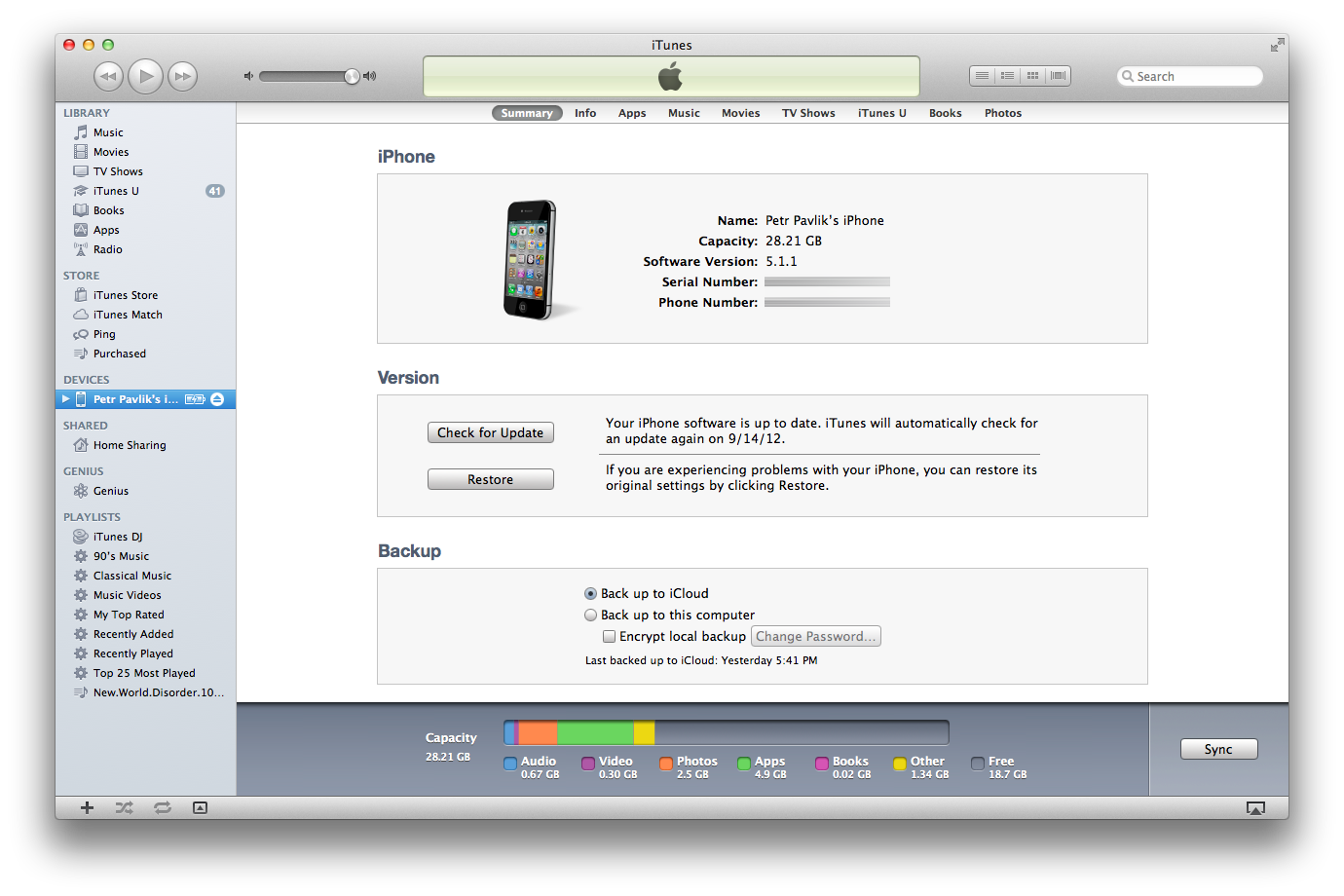
I did not realise that I can scroll down to see additional content where I can enable the wi-fi syncing.
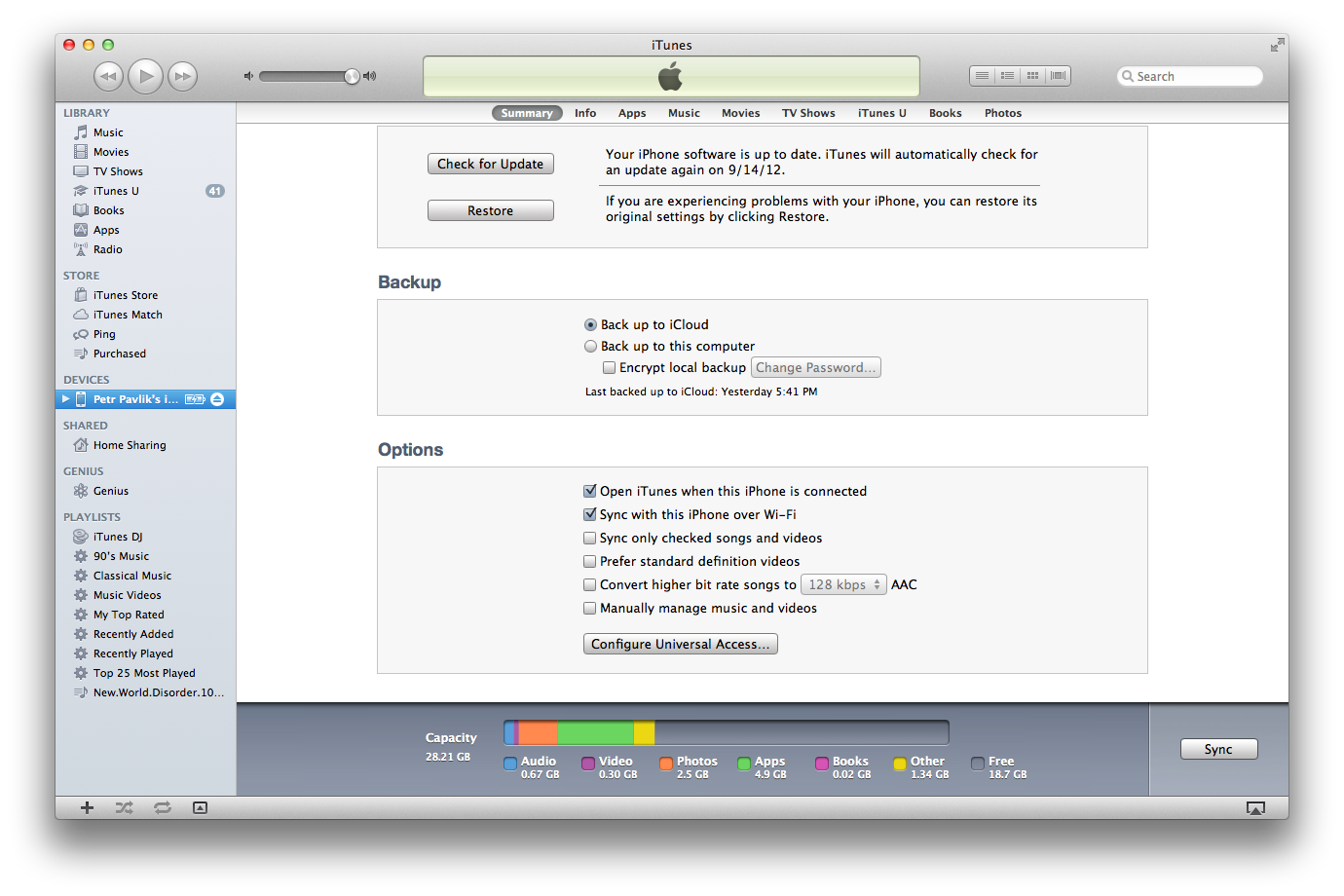
There is always the option that I’m an idiot but I also have the experience that people are having this issue a lot. If the structure of a content on the screen is very distinct, people don’t know that they can scroll the content. On the other hand, if the content is very homogenous like a list of email previews or a list of tweets, people don’t seem to have a problem to realise that they can scroll the content.
Adding Copy Functionality to UITableView
iMessage on iPhone allows you to copy the content of a message by long pressing on a cell. This article shows you how to mimic this behaviour on iOS 5+.
Implementing such functionality used to be pretty hard (http://stackoverflow.com/questions/1146587/how-to-get-uimenucontroller-work-for-a-custom-view) but in iOS 5, all you have to do is to implement following 3 delegate methods for your UITableView.
– tableView:shouldShowMenuForRowAtIndexPath:
– tableView:canPerformAction:forRowAtIndexPath:withSender:
– tableView:performAction:forRowAtIndexPath:withSender:
Implementation of the copy functionality can look something like this.
-(void)tableView:(UITableView*)tableView performAction:(SEL)action forRowAtIndexPath:(NSIndexPath*)indexPath withSender:(id)sender {

    UIPasteboard* pasteboard = [UIPasteboard generalPasteboard];

    Message* message = [self.messages objectAtIndex:indexPath.row];

    pasteboard.string = message.text;
}

-(BOOL)tableView:(UITableView*)tableView canPerformAction:(SEL)action forRowAtIndexPath:(NSIndexPath*)indexPath withSender:(id)sender {

    if (action == @selector(copy:)) {
        return YES;
    }

    return NO;
}

-(BOOL)tableView:(UITableView*)tableView shouldShowMenuForRowAtIndexPath:(NSIndexPath*)indexPath {
    return YES;
}
Blocks and Retained Variables
Lets say you want to download an image in a UIViewController. This should certainly be done in a background thread and the modern approach is to use blocks.
Blocks are great but not as easy to use as some people may think. Everybody should know about the fact that blocks retain their variables. So I decided to give you a very simple and straightforward example of what can happen while using blocks and how to avoid it. Please note that I’m using ARC and I decided to use dispatch_after to mimic the behavior of downloading an image.
//
//  BlockViewController.m
//  Blocks
//
//  Created by Petr Pavlik on 7/8/12.
//  Copyright (c) 2012 Petr Pavlik. All rights reserved.
//

#import "BlockViewController.h"

@interface BlockViewController ()

@property (nonatomic, strong) NSString* something;

@end

@implementation BlockViewController

@synthesize something;

- (void)dealloc {
    NSLog(@"block controller deallocated");
}

- (void)viewDidLoad
{
    [super viewDidLoad];
	// Do any additional setup after loading the view.

    NSLog(@"about to fire the block");

    double delayInSeconds = 5.0;
    dispatch_time_t popTime = dispatch_time(DISPATCH_TIME_NOW, delayInSeconds * NSEC_PER_SEC);
    dispatch_after(popTime, dispatch_get_main_queue(), ^(void){

        NSLog(@"block reached");
        self.something = @"something";
    });
}

@end
Now imagine the situation where you push this view controller and pop it before the block is fired. Following listing shows my output of the console.
2012-07-08 10:56:45.468 Blocks[10117:f803] about to fire the block
2012-07-08 10:56:50.527 Blocks[10117:f803] block reached
2012-07-08 10:56:50.528 Blocks[10117:f803] block controller deallocated
I popped the view controller pretty much immediately after it appeared, definitely before the block should have been executed. And yet the view controller was deallocated five seconds later, right after the block was executed. Now this is bad, imagine that you would be pushing and pulling the view controller again and again. The application would probably crash at some point because there will be to many live instances of the view controller.
This happened because of the line of code that I have highlighted. All variables that appear in a block gets retained and live at least as long as the block itself. You can imagine the block as an object that you pass to dispatch_after function. This function keeps a reference to the block until five seconds pass. Than it executes the block and drops the reference to it.
The solution is not to use self in the block. You can create a weak pointer to self and use it in the block.
//
//  BlockViewController.m
//  Blocks
//
//  Created by Petr Pavlik on 7/8/12.
//  Copyright (c) 2012 uLikeIT. All rights reserved.
//

#import "BlockViewController.h"

@interface BlockViewController ()

@property (nonatomic, strong) NSString* something;

@end

@implementation BlockViewController

@synthesize something;

- (void)dealloc {
    NSLog(@"block controller deallocated");
}

- (void)viewDidLoad
{
    [super viewDidLoad];
	// Do any additional setup after loading the view.

    NSLog(@"about to fire the block");
    __weak BlockViewController* weakSelf = self;

    double delayInSeconds = 5.0;
    dispatch_time_t popTime = dispatch_time(DISPATCH_TIME_NOW, delayInSeconds * NSEC_PER_SEC);
    dispatch_after(popTime, dispatch_get_main_queue(), ^(void){

        NSLog(@"block reached");

        if (!weakSelf) { NSLog(@"reference to self is nil"); }

        weakSelf.something = @"something";
    });
}

@end
Now the output from the console would look like this.
2012-07-08 11:00:05.209 Blocks[10152:f803] about to fire the block
2012-07-08 11:00:06.731 Blocks[10152:f803] block controller deallocated
2012-07-08 11:00:10.212 Blocks[10152:f803] block reached
2012-07-08 11:00:10.212 Blocks[10152:f803] reference to self is nil
As you can se, I popped the view controller like a second after it appeared and the view controller was immediately deallocated. The block was executed but the view controller had been already deallocated and the weak pointer to it was automatically set to nil (yeah, weak pointers are cool).
Twitter-like Notification
I really like how inapp notifications work in the latest version of Twitter for iPhone (July 2012). This approach also seems to be very easy to implement so I decided to create a very easy example showing one way how this can be done.
The trick is to add a label or whatever you want to application’s window. That’s an easy task since UIWindow is a sublass of UIView. Once you have this done, you can easily hide the native statusbar and display the label.
//
//  NotifWindow.m
//  TwitterLikeNotification
//
//  Created by Petr Pavlik on 7/11/12.
//  Copyright (c) 2012 Petr Pavlik. All rights reserved.
//

#import "NotifWindow.h"

@interface NotifWindow ()

@property(nonatomic, strong) UILabel* notificationLabel;

@end

@implementation NotifWindow

@synthesize notificationLabel = _notificationLabel;

- (void) showNotificationWithText:(NSString*)text {

    if (!self.notificationLabel) {
        self.notificationLabel = [[UILabel alloc] initWithFrame:CGRectMake(0, 0, 320, 20)];
        self.notificationLabel.textColor = [UIColor colorWithRed:1.0 green:1.0 blue:1.0 alpha:0.8];
        self.notificationLabel.backgroundColor = [UIColor blackColor];
        self.notificationLabel.textAlignment = UITextAlignmentCenter;
        self.notificationLabel.font = [UIFont boldSystemFontOfSize:13.0f];
        [self addSubview:self.notificationLabel];
    }

    self.notificationLabel.text = text;

    self.notificationLabel.frame = CGRectMake(0, -20, 320, 20);

    [[UIApplication sharedApplication] setStatusBarHidden:YES withAnimation:UIStatusBarAnimationSlide];

    __weak NotifWindow* weakSelf = self;

    double delayInSeconds = 0.5;
    dispatch_time_t popTime = dispatch_time(DISPATCH_TIME_NOW, delayInSeconds * NSEC_PER_SEC);
    dispatch_after(popTime, dispatch_get_main_queue(), ^(void){

        [UIView animateWithDuration:0.5 animations:^{
            weakSelf.notificationLabel.frame = CGRectMake(0, 0, 320, 20);
        }];

    });

    delayInSeconds = 4.0;
    popTime = dispatch_time(DISPATCH_TIME_NOW, delayInSeconds * NSEC_PER_SEC);
    dispatch_after(popTime, dispatch_get_main_queue(), ^(void){

        [UIView animateWithDuration:0.5 animations:^{
            weakSelf.notificationLabel.frame = CGRectMake(0, -20, 320, 20);
        }];

    });

    delayInSeconds = 4.5;
    popTime = dispatch_time(DISPATCH_TIME_NOW, delayInSeconds * NSEC_PER_SEC);
    dispatch_after(popTime, dispatch_get_main_queue(), ^(void){

        [[UIApplication sharedApplication] setStatusBarHidden:NO withAnimation:UIStatusBarAnimationSlide];
    });

}

@end
And this is how it can be used.
- (IBAction)showNotification:(id)sender {

    NotifWindow* notifWindow = (NotifWindow*)self.view.window;
    [notifWindow showNotificationWithText:@"Nice!"];

}
Please note that this is a very simple example. If you want to implement such functionality into your app, you shout take care of things like handling of landscape mode or queuing of notifications.
Hello world!
Welcome to WordPress.com. After you read this, you should delete and write your own post, with a new title above. Or hit Add New on the left (of the admin dashboard) to start a fresh post.
Here are some suggestions for your first post.
- You can find new ideas for what to blog about by reading the Daily Post.
- Add PressThis to your browser. It creates a new blog post for you about any interesting page you read on the web.
- Make some changes to this page, and then hit preview on the right. You can always preview any post or edit it before you share it to the world.
 Petr Pavlik